Nexus Trigger: Date/Time
This trigger allows you to execute commands at scheduled times. You can set it to trigger on a specific minute of ever hour, and on one specific time as well. Additionally, you can set it to trigger at the set time daily, on a certain weekday, or on one specific date every year.
The various settings for month, day, hour and minute can be mixed and matched. A few examples: if you want your command to run at noon at every October, you can set the month to 10, leave the day blank, set the hour to 12 and set the minute to 0. But if you only want to run the command once an hour on every first day of the month, you can leave the month blank, set the day to 1, leave the hour blank and set the minute to 0. If you want to make a command that runs when the new year begins, you can set the month to 1, the day to 1, the hour to 0 and the minute to 0.
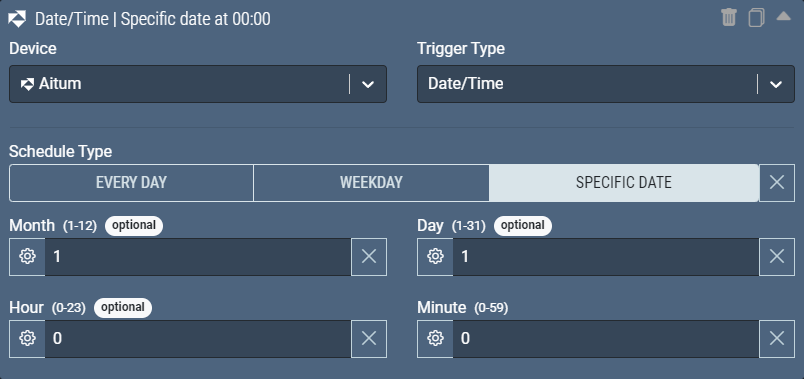
Date/Time Inputs
Schedule Type
| Type | Other | | ——– | —– | | Required | Yes |
- Every Day: The command runs at the specified time(s), regardless of what day it is.
- Weekday: The command runs at the specified time(s) on a certain weekday.
- Specific Date: The command runs at the specified time(s) only on certain dates.
Weekday
This sets the weekday the command should be executed at. This field is only shown when the “Schedule Type” is set to “Weekday”
| Type | Weekday |
|---|---|
| Required | No |
| Local Variable | No |
Month
Which month the command should be executed at. This field is only shown when the schedule type is set to “specific date”. If it’s left blank, it will execute on the specified day of every month.
| Type | Number |
|---|---|
| Required | No |
| Local Variable | No |
| Minimum Value | 1 |
| Maximum Value | 12 |
Day
Which day the command should be executed at. This field is only shown when the schedule type is set to “specific date”. If it’s left blank, it will execute on every day of the specified month. If the date is set to one that does not exist in the current month, it will be skipped.
| Type | Number |
|---|---|
| Required | No |
| Local Variable | No |
| Minimum Value | 1 |
| Maximum Value | 31 |
Hour
What hour the command should be executed at. If it’s left blank, it will run on the specified minute of every hour. This trigger assumes 24/hour time, so if you want the command to trigger at 1pm, you’ll have to set this to 13.
| Type | Number |
|---|---|
| Required | No |
| Local Variable | No |
| Minimum Value | 0 |
| Maximum Value | 23 |
Minute
What minute the command should be executed at.
| Type | Number | | ——————– | ————— | | Required | Yes | | Local Variable | No | | Minimum Value | 0 | | Maximum Value | 59 | —
Hidden Variables
Hidden Variables are available as Local Variables within the actions of a command, but you will not see these fields visually on the Trigger. These can also be used with a New Command Check, more info here on Checks.
There are no hidden variables for this trigger type.